mysql은 대소문자 구별을 안하지만 대소문자를 구분하는 형식으로 설정되거나 설치되어있을 수도 있다.
리눅스 대소문자 구분에 대한 명령어
# show variables like 'lower_case_table_names';
[root@localhost ~]# mysql -u root -p
Enter password:
Welcome to the MariaDB monitor.  Commands end with ; or \g.
Your MariaDB connection id is 3
Server version: 5.5.68-MariaDB MariaDB Server

Copyright (c) 2000, 2018, Oracle, MariaDB Corporation Ab and others.

Type 'help;' or '\h' for help. Type '\c' to clear the current input statement.

MariaDB [(none)]> show variables like 'lower_case_table_names';
+------------------------+-------+
| Variable_name          | Value |
+------------------------+-------+
| lower_case_table_names | 0     |
+------------------------+-------+
1 row in set (0.00 sec)
value값이 0 -> 대소문자 구분
value값이 1 -> 대소문자 구분안함
대소문자 구분 설정은
경로 /etc/my.cnf.d/server.cnf 를 편집기로 열어서
[mysqld]부분에 lower_case_table_names=1 를 넣어준다
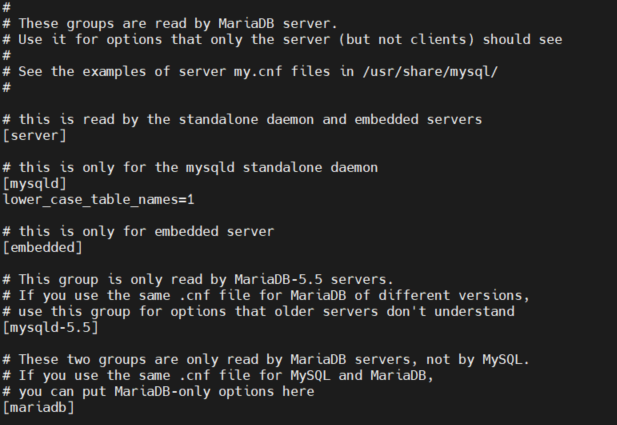
편집기를 끝내고
systemctl restart maraidb 재시작을 해준면 끝
MariaDB [(none)]> show variables like 'lower_case_table_names';
+------------------------+-------+
| Variable_name          | Value |
+------------------------+-------+
| lower_case_table_names | 1     |
+------------------------+-------+
1 row in set (0.00 sec)
'Programming | Study > MySQL' 카테고리의 다른 글
| [MySQL] delete문으로 여러 테이블 데이터 삭제 (0) | 2022.01.19 |
|---|---|
| [Mysql] where 1=1 (0) | 2021.09.24 |
| [MySQL] TIMESTAMP (0) | 2021.08.26 |


댓글